


Secure Your Site: The Ultimate WordPress Security Plugin Review
wordpress site security plugin: 10 Powerful & Proven Solutions 2025
Securing Your WordPress Site: What You Need to Know
If you’re looking for the best wordpress site security plugin to protect your website, here’s a quick comparison of the top options:
| Plugin | Best For | Key Features | Free Version | Premium Starts At |
|---|---|---|---|---|
| Plugin A | Complete protection | Endpoint firewall, malware scanning, login security | Yes | $99/year |
| Plugin B | Small businesses | Cloud-based WAF, malware removal, blocklist monitoring | Yes | $199/year |
| Plugin C | Ease of use | Progressive firewall, login protection, content security | Yes | $70/year |
| Plugin D | Login hardening | Two-factor authentication, password policies, brute force protection | Yes | $80/year |
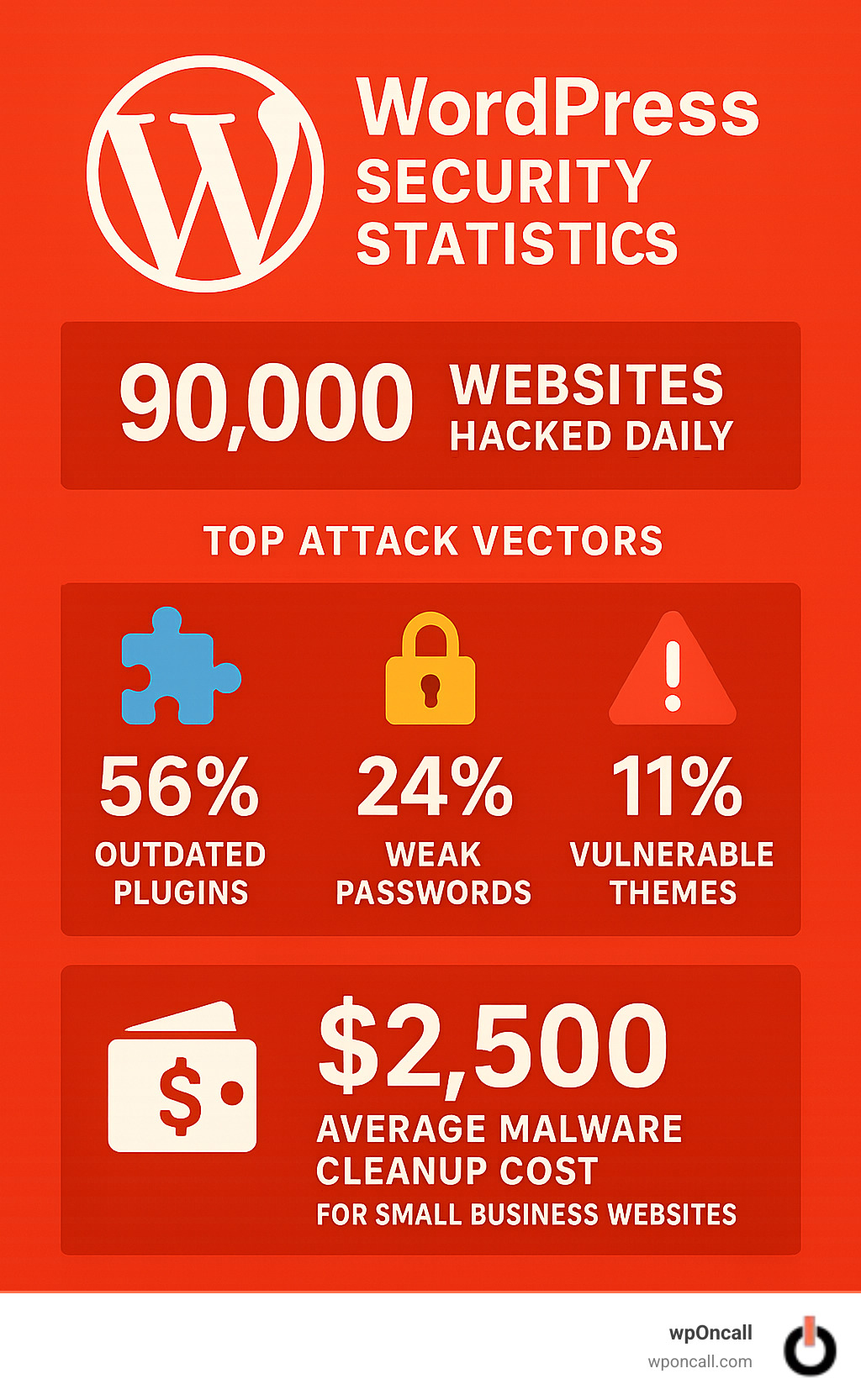
Your wordpress site security plugin is the first line of defense against the 90,000+ websites that get hacked every single day. Without proper protection, your business site is vulnerable to malware, data breaches, and even being blocklisted by Google—potentially destroying your reputation and revenue overnight.
The good news? The right security plugin can shield your site from most common threats with minimal setup and maintenance.
I’m Kevin Gallagher, and with over 15 years of experience building and securing WordPress websites, I’ve tested every major wordpress site security plugin to identify which ones truly deliver on their promises. At wpONcall, we’ve protected hundreds of client websites using these very tools, removing malware and preventing attacks before they can do damage.
Quick wordpress site security plugin definitions:
– how to secure wordpress site from hackers
– wordpress site security
What You’ll Learn
In this comprehensive guide, we’ll cover:
– Why WordPress security is absolutely essential for your website
– The most common threats targeting WordPress sites today
– Must-have features to look for in a wordpress site security plugin
– Differences between free and premium security plugins
– Step-by-step configuration tips to maximize your protection
– Answers to frequently asked questions about WordPress security
By the end of this article, you’ll be equipped to choose the right security solution for your specific needs and implement it effectively.
Why WordPress Security Is Non-Negotiable
I know what you’re thinking—”My little website isn’t a target for hackers.” I hear this all the time from new clients, right before we find suspicious code hiding in their themes. The hard truth? Over 90,000 websites are hacked every single day, and WordPress sites are like catnip to cybercriminals because of their widespread use and the plugin ecosystem that can introduce vulnerabilities.
One of our security plugin users put it perfectly in their review: “All day and night it keeps our site safe from creeps and hackers.” That continuous protection isn’t just nice to have—it’s essential in today’s digital landscape.
When your WordPress site gets compromised, the fallout can be devastating in ways many site owners never anticipate:
Getting blacklisted by Google happens to over 10,000 sites daily. One day you’re ranking well, the next you’ve disappeared from search results entirely—taking your traffic and revenue with it.
Suffering a data breach isn’t just embarrassing—it can trigger legal obligations to notify your users, potentially leading to lawsuits and a PR nightmare that follows you for years.
The reputation damage from visitors seeing browser warnings about your “deceptive site” or finding pharmaceutical spam links throughout your content can be impossible to fully recover from.
And if you’re in certain industries, compliance violations resulting from security breaches might mean regulatory fines that make your hosting bill look like pocket change.
Learn more about how to secure your WordPress site from hackers before it’s too late.
Hidden Costs of a Breach
The price tag of inadequate security extends far beyond the obvious. I’ve seen too many businesses caught off guard by these hidden costs:
Downtime is the silent killer of online businesses. Most hacked sites experience 3-7 days of complete downtime during cleanup—that’s a week of zero sales, zero leads, and zero new customers.
Recovery fees can be shocking if you’re unprepared. Professional malware removal typically costs between $200 and $2,500 depending on how deeply the infection has spread. And that’s assuming you catch it early.
Perhaps most valuable of all is customer trust, which once broken is incredibly difficult to rebuild. Our research shows more than two-thirds of customers won’t return to a site after encountering security issues—even if they loved your products or services before.
One of our clients shared this painful lesson after recovering from a breach: “We spent more on cleanup and lost business than we would have spent on five years of premium security protection. The lesson was expensive.”
A good wordpress site security plugin isn’t an optional extra—it’s the insurance policy that protects everything you’ve worked so hard to build. The question isn’t whether you can afford good security; it’s whether you can afford to be without it.
Understanding the Threat Landscape
Before you can properly shield your WordPress site, you need to know what you’re up against. The digital threat landscape is like an ever-shifting battlefield, but certain attack strategies remain consistently popular among hackers.

When we look at what’s targeting WordPress sites today, the picture gets concerning pretty quickly. Brute force attacks hammer at your login page day and night—sites protected by Wordfence typically block an average of 62 probing attempts daily. That’s someone (or something) trying to guess your password every 23 minutes!
Meanwhile, SQL injection attacks quietly try to slip malicious code into your database queries, potentially giving attackers access to your entire site database. Cross-site scripting (XSS) is equally sneaky, inserting harmful scripts that activate when your innocent visitors browse your pages.
Then there’s the broad category of malware infections—backdoors that let attackers return whenever they want, crypto miners that steal your server resources, and ransomware that can lock you out of your own site. We’ve seen sites where owners didn’t even know they were compromised until their hosting company shut them down for suspicious activity.
SEO spam attacks might seem less harmful at first glance, but they can be devastating to your business. These attacks inject hidden links or content to manipulate search rankings, potentially getting your site penalized by Google. One of our clients finded their organic traffic had dropped 80% before realizing their site had been injected with hundreds of invisible links to questionable pharmaceutical sites.
Other prevalent threats include credential stuffing (using passwords leaked from other sites), zero-day exploits (attacks targeting newly finded vulnerabilities before patches are available), and botnet attacks (coordinated assaults from networks of compromised computers).
Common Entry Points
The truth is, hackers don’t need to be computer geniuses when WordPress sites often have so many open uped doors:
Outdated plugins remain the #1 security vulnerability on WordPress sites. It’s shocking but true—Wordfence scans for signatures of over 44,000 known malware variants specifically targeting WordPress plugins. Just last month, we helped a small business owner whose site was completely taken over through a plugin that hadn’t been updated in 18 months.
Weak passwords continue to be a serious problem. That “password123” might be easy to remember, but automated cracking tools can guess it in literal seconds. Similarly, nulled themes and plugins (pirated premium products) often come with nasty surprises—backdoors or malware pre-installed by the “generous” pirates offering them for free.
Misconfigured hosting settings create vulnerabilities at the server level that even the best wordpress site security plugin might struggle to compensate for. File permissions, PHP settings, and server software versions all play critical roles in your site’s security posture.
Host-Level vs Plugin-Level Attacks
Effective WordPress security requires a multi-layered approach—think of it like protecting your home with both locks on the doors and an alarm system.
Server hardening represents your first line of defense—security measures implemented by your hosting provider. This includes firewalls, intrusion detection systems, and proper server configuration. Some hosts do this better than others, which is why we often recommend security-focused WordPress hosting.
Web Application Firewall (WAF) layers can be implemented at both the server level and through your wordpress site security plugin. These intelligent filters examine incoming traffic and block suspicious requests before they can reach your WordPress installation.
Content Delivery Network (CDN) shields like Cloudflare add another protective layer, filtering traffic before it even reaches your hosting server. This can stop many attacks at the network edge, reducing the burden on your site’s security systems.
Understanding how these different security layers work together helps you build a comprehensive protection strategy rather than relying on a single solution. At wpOncall, we’ve found that the most secure WordPress sites combine quality hosting, a robust wordpress site security plugin, and regular maintenance—creating a security posture that’s much stronger than any individual component could provide alone.
Choosing the Right wordpress site security plugin
Finding the perfect wordpress site security plugin can feel like searching for a needle in a haystack. With so many options claiming to be “the best,” how do you know which one truly deserves a place on your website?
Think of your security plugin as your website’s personal bodyguard – you want one that’s vigilant, thorough, and doesn’t get in the way of your daily operations. The best plugins combine several essential features that work together to create a security fortress around your WordPress site.
When we help clients at wpOncall, we always recommend looking for plugins that include firewall protection, malware scanning, login security measures, uptime monitoring, and automated backups. The most reliable options also offer alerting systems, two-factor authentication, rate limiting to prevent brute force attacks, and automatic updates. For vetted options, the WordPress.org plugin directory remains the safest place to start your search.
Firewall Essentials in a wordpress site security plugin
Your firewall is like the bouncer at the door of your website – deciding who gets in and who gets turned away. There are two main approaches to WordPress firewalls, each with their own strengths:
Endpoint firewalls live directly on your server as part of WordPress. Quality endpoint firewalls provide “deeper integration that cannot be bypassed by encryption or cloud WAF weaknesses.” It’s like having a security guard who lives in your building rather than watching remotely.
Cloud WAFs, on the other hand, filter traffic before it even reaches your door. This method “blocks malicious traffic before it ever reaches your website.” Think of it as stopping troublemakers before they even get to your neighborhood.
The best firewalls include customizable rule sets that protect against common attacks, IP blocking capabilities to ban known troublemakers (quality firewalls can block millions of malicious requests daily), and rate limiting to prevent your site from being overwhelmed by too many simultaneous requests.
Malware Detection in a wordpress site security plugin
Even with the best bouncer at the door, sometimes unwanted guests slip through. That’s where robust malware detection comes in.
Effective wordpress site security plugins use multiple detection methods. Signature scans work like a wanted poster, identifying known malicious code patterns. More advanced plugins also use AI-powered heuristic detection, which can spot suspicious behavior that might indicate new, previously unknown malware – like a security guard who notices someone acting strangely even if they can’t immediately identify why.
File integrity monitoring is another crucial feature that alerts you when core WordPress files change unexpectedly. Top security plugins stand out with innovative approaches to WordPress salts, adding new characters and rotating them regularly for improved protection.
When malware is found, quarantine capabilities isolate the threat, while cleanup tools help remove the infection and repair any damage – saving you from the headache (and expense) of manual remediation.
Login & User Hardening
Your login page is like the front door to your house – and unfortunately, it’s where most break-in attempts happen.
Strong wordpress site security plugins offer two-factor authentication, requiring a second verification step beyond passwords. It’s like requiring both a key and a fingerprint to enter. CAPTCHA integration helps prevent automated login attempts by robots, while some advanced plugins even offer passwordless login options that verify identity through email or other methods.
Session management features limit how many active sessions a user can have and force logouts after periods of inactivity. Quality security plugins excel with role-specific two-factor authentication rules and trusted device whitelisting that prevents session hijacking.
User role hardening is another important feature that restricts capabilities based on need – not everyone who enters your house needs access to every room, after all.
Performance & Compatibility Checks
Security shouldn’t come at the cost of a slow, clunky website. The best wordpress site security plugins are designed with performance in mind.
Look for plugins that are compatible with your server’s PHP version to avoid technical conflicts. Cache-friendly security plugins work harmoniously with performance optimization tools rather than fighting against them. And if you use staging sites to test changes before they go live (a practice we strongly recommend at wpOncall), your security plugin should support this workflow.
The best security plugins stand out for their thoughtful approach to performance, using cloud-based scanning that keeps resource usage on your server to a minimum – perfect for sites on budget hosting plans where every bit of processing power counts.
The right security plugin isn’t just about having the longest feature list – it’s about finding the solution that fits your specific needs while maintaining your site’s performance and user experience.
Free vs Premium: Which Tier Delivers Better Protection?
When it comes to choosing a wordpress site security plugin, one of the biggest decisions you’ll face is whether to stick with a free version or invest in premium protection. Let’s break down what you’re really getting at each price point.
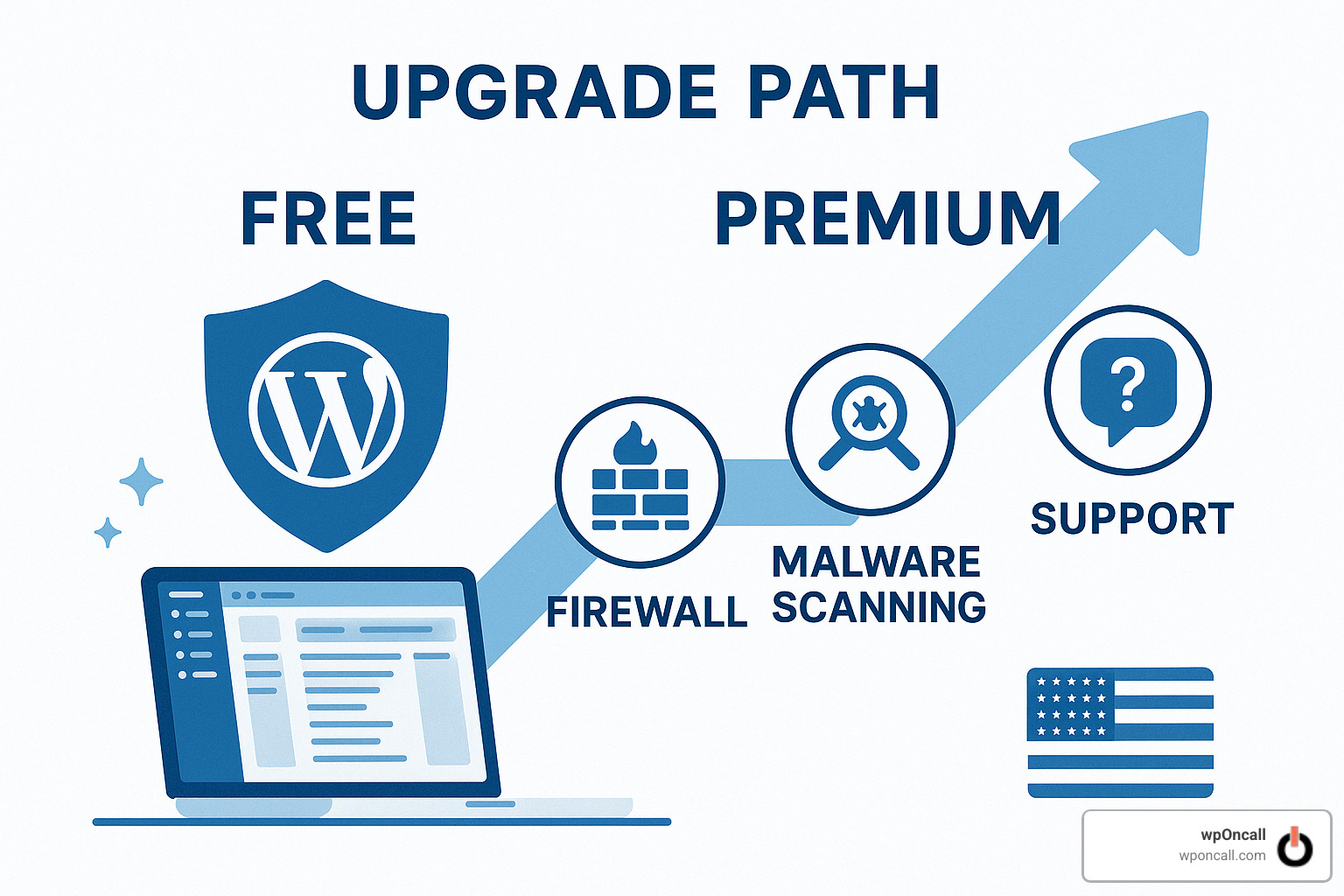
| Feature | Free Versions | Premium Versions |
|---|---|---|
| Firewall | Basic rules, delayed updates | Real-time rule updates, advanced IP blocking |
| Malware Scanning | Limited frequency, basic detection | Frequent scans, advanced detection, automatic cleanup |
| Login Security | Basic brute force protection | Advanced 2FA, geo-blocking, role-based restrictions |
| Support | Forum support, delayed response | Priority support, incident response |
| Updates | Delayed threat intelligence | Real-time threat intelligence |
| Cost | $0 | $70-$229/year depending on plugin and features |
When a Free Plugin Is Enough
Not everyone needs to shell out for premium security right away. In fact, free security plugins can be perfectly adequate in several situations.
If you’re running a personal blog without sensitive data or payment processing, a free plugin might offer enough protection to sleep soundly. The same goes for low-traffic websites that don’t attract as much attention from hackers – you’re essentially a smaller target.
Budget constraints are real, too. As one security expert I spoke with put it: “A plugin’s free version often serves more as an alert system than full protection.” But sometimes, that early warning is exactly what you need if you’re willing and able to jump into action when notified.
Take the free version of quality security plugins, for example. You’ll get core firewall and malware scanning capabilities – they’re just delivered with a delay on threat intelligence updates. For a hobby site or personal project, this trade-off might be perfectly reasonable.
Signs You Need Premium Protection
That said, there are clear signals that it’s time to upgrade to premium security. If any of these sound familiar, it’s probably worth the investment:
You’re running an eCommerce site where customer data and payment processing happen daily. The stakes are simply higher, and the potential costs of a breach far outweigh the annual subscription fee.
You operate membership sites where protecting user accounts is paramount. Nothing kills trust faster than telling your members their data has been compromised.
Your business faces compliance requirements like GDPR, HIPAA, or other regulations that mandate specific security measures. Premium plugins often include features specifically designed to help meet these standards.
If you’ve been hacked before, that’s a clear sign you’re on someone’s radar. Previous compromises often indicate you’re a target, and lightning can absolutely strike twice when it comes to website security.
You lack technical resources to handle security manually. If you don’t have the time or expertise to respond to security alerts, you need the automated remediation that premium options provide – not just notifications about problems.
As security experts wisely note, “Freemium plugins may suffice for personal blogs but aren’t strong enough for eCommerce sites.” This matches what we see daily at wpOncall, where we typically recommend premium security solutions for business websites.
One of our eCommerce clients shared a sobering perspective after upgrading: “After upgrading to a premium security plugin, we blocked over 450,000 attacks in three months. That’s nearly 5,000 attempted breaches every day that would have threatened our customers’ data.”
When you consider that the average cost of cleaning up a hacked site starts around $200 and can quickly climb into the thousands – not to mention lost revenue during downtime – that annual premium fee of $70-$229 starts looking like an incredible bargain.
Setup, Performance & Maintenance Best Practices
Having the right wordpress site security plugin is only half the battle. Proper configuration and maintenance are equally important – something we’ve learned at wpOncall after helping hundreds of WordPress site owners sleep better at night.
When I’m setting up security for a new client, I always follow a methodical approach that balances protection with performance. First, I run a thorough security audit to establish a baseline – this gives us a clear picture of what we’re working with. Then, rather than flipping all the switches at once (which can break things in spectacular ways!), I enable features progressively and test after each change.
“Think of your security setup like building a house,” I often tell clients. “You need a solid foundation before you start worrying about an alarm system.”
Remember to document your configuration choices too. You’d be surprised how often this simple step saves headaches down the road when troubleshooting or making changes.
Optimizing Firewall Modes
Most wordpress site security plugin options offer different firewall modes, and choosing the right one for your site matters tremendously.
The basic mode is perfect for initial testing – it applies minimal rules while you confirm everything works properly. Think of it as dipping your toe in the water before diving in. The intermediate mode strikes a nice balance between solid protection and compatibility with most sites. For high-risk websites (like eCommerce stores), the advanced mode provides maximum protection but might require some fine-tuning.
Quality security plugins with progressive firewall models are particularly user-friendly. One of our clients who manages her own yoga studio website told me, “I was terrified of breaking my site, but the progressive firewall let me increase protection gradually as I got more comfortable.” Start in basic mode, test thoroughly with your forms and plugins, then gradually increase protection as you confirm everything still works.
Automating Alerts & Incident Response
The faster you know about a problem, the faster you can fix it. That’s why setting up proper alerts is crucial for effective WordPress security.
Email notifications are the bare minimum for critical security events. For business-critical sites, consider connecting your wordpress site security plugin with Slack or other team communication tools. Some of our clients even prefer SMS alerts for truly urgent issues – because a compromised website doesn’t politely wait until Monday morning to cause problems.
Many security plugins offer useful dashboards for managing multiple sites. As one of our clients who manages seven WordPress sites put it: “Having all my security alerts in one place means I actually see them instead of losing them in my inbox.” These platforms allow you to receive notifications via email, SMS, or Slack and respond quickly when issues arise.
Hosting Environment Integration
Your hosting environment and security plugin need to play nicely together – something that’s not always automatic.
Managed WordPress hosts like WP Engine or Kinsta often have their own security measures in place, which is great! But they might also restrict certain plugin features that could conflict with their systems. For example, some hosts maintain lists of disallowed plugins to protect performance and security.
If your site uses object caching through Redis or Memcached, verify that your chosen security plugin works well with these systems. Incompatibilities here can lead to mysterious performance issues that are difficult to diagnose.
A Santa Rosa client found this the hard way: “Our managed host was silently blocking half our security plugin’s features without telling us. Switching to a compatible solution made a huge difference in our protection level.” We helped them find a security plugin that complemented their hosting environment rather than fighting against it.
When everything works in harmony – your hosting, security plugin, and maintenance practices – you’ll have a WordPress site that’s not just secure, but also performs well and remains easy to manage. At wpOncall, that’s exactly the balance we help our clients achieve through our WordPress security support services.
Frequently Asked Questions about WordPress Security Plugins
Do security plugins guarantee 100% protection?
Let’s be honest – no security plugin can promise you a completely hack-proof site. It’s a bit like having a great home security system – it significantly reduces your risk, but determined thieves might still find a way in.
As security experts candidly admit, “Can a WordPress security plugin stop all attacks on my site? No, it cannot.”
Think of your wordpress site security plugin as your first line of defense in a larger security strategy. At wpOncall, we’ve learned that the best protection comes from layering different security measures:
“We had a client who relied solely on their security plugin and still got hacked,” shares our lead developer. “After we implemented a comprehensive approach with server-level hardening, regular backups, and user training alongside their plugin, they haven’t had an issue in three years.”
Your complete security approach should include:
– Keeping WordPress core, themes, and plugins updated religiously
– Enforcing strong passwords and educating your team about security
– Maintaining regular offsite backups (your safety net if things go wrong)
– Implementing server-level security measures with your host
How often should I run malware scans?
This is like asking how often you should check your smoke detectors – it depends on what you’re protecting!
For high-risk sites like eCommerce stores or membership sites handling sensitive data, daily automated scans are your best bet. Medium-risk business sites or popular blogs should aim for 2-3 weekly scans, while personal blogs or static sites can usually get by with weekly checks.
I remember one client who thought weekly scans were “good enough” for their online store. Unfortunately, malware had been quietly collecting customer data for four days before being detected. Now they scan daily and sleep better at night.
Premium wordpress site security plugin options typically offer more frequent automated scanning. Quality security plugins check premium sites every 4-12 hours, while free users must manually initiate scans.
A smart consideration is where the scanning happens. Some plugins cleverly offload malware scanning to their own servers, which means it won’t bog down your site even if you’re on a budget hosting plan.
Will a security plugin slow down my site?
This concern comes up in almost every conversation we have with new clients at wpOncall. The honest answer is: maybe a little, but probably not noticeably if you configure things properly.
Modern wordpress site security plugin options have become increasingly efficient. Quality security plugins directly address this worry: “Will this security plugin slow down my website? No. The plugin is optimized to run efficiently without impacting site performance.”
The performance impact depends on a few key factors:
– Which specific security features you enable (more isn’t always better)
– How the plugin is built and optimized
– Your hosting environment’s resources
– How much traffic your site receives
“I was worried about slowdowns when I installed a security plugin,” one of our clients told me recently, “but my page speed actually improved because it blocked so many malicious bots that were hammering my site.”
To keep things running smoothly, enable only the security features you genuinely need, choose a plugin known for efficiency, test on a staging site first, and monitor performance after implementation.
In our experience at wpOncall, the tiny performance impact from a well-configured security plugin is nothing compared to the catastrophic slowdown (or complete shutdown) caused by an actual hack. It’s like worrying about the weight of your bike lock while ignoring the fact that without it, you might not have a bike at all!
Conclusion
Choosing the right wordpress site security plugin isn’t just another task on your website to-do list—it’s an essential investment in your site’s future. While perfect security doesn’t exist (anyone who promises otherwise isn’t being honest), the right plugin dramatically reduces your risk and gives you that precious peace of mind we all need.
At wpOncall, we’ve tested these plugins in real-world scenarios, and here’s what we’ve learned:
- Plugin A shines brightest when you need comprehensive protection, thanks to its powerful endpoint firewall and vast threat intelligence network that catches emerging threats
- Plugin C hits the sweet spot between powerful features and user-friendliness, making it perfect if you’re just starting your security journey
- Plugin B is your go-to when disaster has already struck, with superior cleanup services to get you back on your feet
- Plugin D excels at keeping the bad guys out of your login page with exceptional user hardening features
Security isn’t something you set up once and forget about. It’s more like tending a garden—requiring regular attention, updates, and adjustments as the threat landscape evolves. What protected you yesterday might not be enough tomorrow.
Here at wpOncall, WordPress security isn’t just something we do—it’s our passion. Our team in Santa Rosa, CA specializes in keeping WordPress sites secure with daily updates, reliable backups, and unlimited support when you need help. We pride ourselves on lightning-fast response times and proactive protection that keeps your site both secure and running smoothly.
Don’t wait until you’re cleaning up after a breach to take security seriously. That’s like installing a home security system after you’ve been robbed—helpful, but wouldn’t it have been better before the break-in? Implement a robust wordpress site security plugin today, follow the best practices we’ve outlined, and consider bringing in professional support to ensure your WordPress site stays protected against whatever new threats emerge.
Learn more about our WordPress security services


